Most businesses start the same way. One person - a founder, a receptionist, a support executive - manages customer chats on the WhatsApp Business App from a single phone.
It works fine. Until it doesn't.
Enquiries multiply. Order updates pile up. Support requests come in faster than one person can type. A second employee needs access, then a third. Someone starts forwarding screenshots between team members just to keep track of who replied to whom.
That's the point where most businesses start asking the real question: is the WhatsApp Business App still enough, or is it time to move to WhatsApp Business API?
This article walks through the actual differences - features, pricing, and where each one fits - so you can make that call with real information instead of guesswork.
WhatsApp Business App vs WhatsApp Business API: What's the Difference?
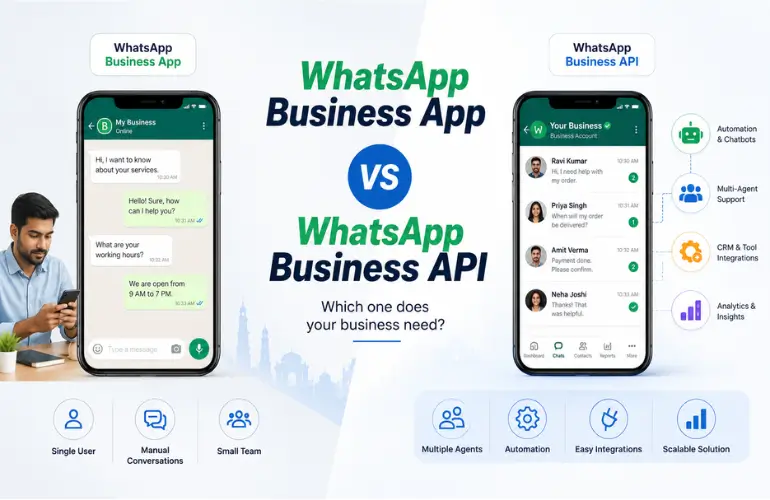
Short answer: The WhatsApp Business App is a free mobile app built for one person or a very small team to message customers manually. The WhatsApp Business API is a messaging infrastructure that lets multiple agents, systems, and automations send and receive WhatsApp messages at scale - usually accessed through a provider or platform, not a phone app.
The App is designed for small businesses and teams managing customer conversations directly. The API is designed to plug into how a business already operates - CRMs, support desks, order systems, marketing tools.
| WhatsApp Business App | WhatsApp Business API | |
|---|---|---|
| Best for | Solo owners, very small teams | Growing and mid-to-large businesses |
| Users/agents | Multiple linked devices; limits vary by account/features | Multiple agents through a connected business platform |
| Automation | Basic auto-replies, greetings | Full automation, chatbots, workflows |
| Integrations | None | CRM, helpdesk, ecommerce, ERP |
| Customer support | Manual, one conversation at a time | Structured, multi-agent, ticket-based |
| Marketing | Manual broadcasts (limited reach) | Approved templates, large-scale campaigns |
| Notifications | Manual | Automated transactional/order alerts |
| Scalability | Limited by human bandwidth | Built for volume |
| Analytics | Basic/native business insights | Delivery, read, and campaign reporting through the provider/platform |
| Cost | Free | Message-based cost + provider/platform fee |
If you're still deciding, the comparison table above usually answers it in one glance. The sections below go deeper into why.
What Is WhatsApp Business App?
The WhatsApp Business App is free to download and provides built-in tools for small businesses that manage customer conversations directly, although some features may be paid or vary by market.
It gives you a business profile, a product catalog, quick replies for common questions, labels to sort chats, and simple automated greeting or away messages. That's genuinely enough for a lot of businesses.
Example: A small clinic with one receptionist handling appointment queries and confirmations through WhatsApp is usually well served by the App. Volume is manageable, one person owns the inbox, and there's no need for automation beyond a basic auto-reply.
Where it starts to strain: once more than one or two people need to reply to customers, once the number of daily conversations climbs into the hundreds, or once the business wants to send appointment reminders or order updates automatically instead of typing each one. The App wasn't built for any of that - it was built for manual, one-to-one conversation.
What Is WhatsApp Business API?
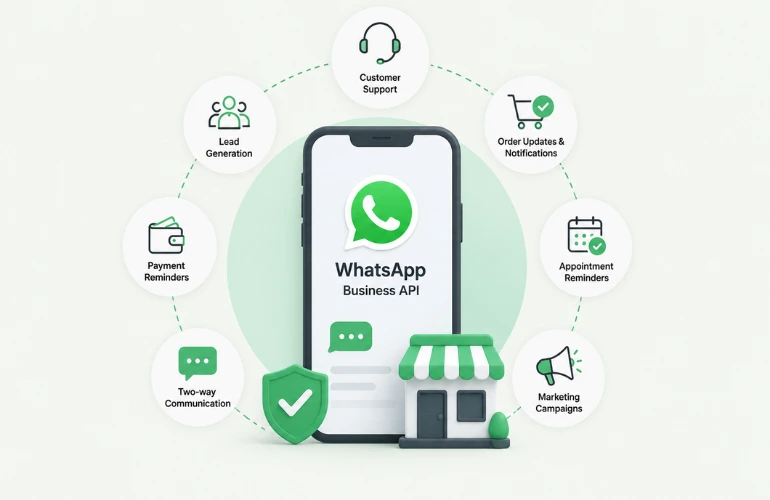
WhatsApp Business API is business messaging infrastructure. It's not an app you open - it's a set of capabilities that a provider or platform gives you access to, so your business can send and receive WhatsApp messages through your own systems, at scale, with multiple people or automated workflows handling the conversation.
In practice, this means:
- Automation - bots handling FAQs, order status checks, or lead qualification before a human ever steps in
- CRM integration - WhatsApp conversations logged against the same customer record your sales or support team already uses
- Multi-agent support - multiple agents replying from one shared business number through a connected business platform, without requiring separate phones
- Approved message templates - pre-approved formats for sending notifications, reminders, and promotions outside a live conversation
- Marketing campaigns - structured, permission-based broadcasts to segmented audiences
- Analytics - delivery rates, read rates, and campaign performance through the provider's dashboard
This is what people usually mean when they search for API of WhatsApp - not a different product, just the platform-level access that powers business-scale messaging.
WhatsApp Business App vs API: Feature-by-Feature Comparison
Number of users and agents
The App supports one primary device plus a few linked devices. The API supports as many agents as your provider's plan and your team size require - there's no hard cap tied to a phone.
Automation
The App offers greeting messages, away messages, and simple quick replies. The API supports full chatbot flows, conditional logic, and handoff from bot to human agent.
CRM and software integration
The App doesn't integrate with anything outside itself. The API connects to CRMs, helpdesks, ecommerce platforms, and internal tools through the provider's integration layer.
Customer support
The App is suitable for small teams handling conversations directly, while the API enables more structured team workflows, routing, automation, and integration with support systems.
Marketing campaigns
The App allows limited manual broadcasts to saved contacts, with restrictions on list size. The API allows structured, templated campaigns to larger, segmented audiences - governed by Meta's approval and consent rules.
Message templates
The App has no template system; every message is typed live. For business-initiated messaging outside the applicable customer service window, businesses generally use approved message templates. When a customer has opened a service conversation, businesses can respond using the messaging options permitted within that window.
Analytics and reporting
The App provides basic/native business insights, while the API can provide delivery, read, and campaign-level reporting through the connected provider or platform.
Scalability
The App scales with how many hours a human can spend typing. The API scales with your infrastructure and budget.
Business workflows
The App is a single inbox. The API can be built into ordering, appointment booking, ticketing, or lead-routing workflows.
Security and compliance
Both run on Meta's WhatsApp platform, but the API requires business verification and template approval, giving Meta more visibility into what's being sent - which matters for regulated industries like healthcare and finance.
Choose the App if: you're a small business, message volume is manageable by one or two people, and you don't need automation or integrations.
Choose the API if: you're scaling, need multiple agents, want automated notifications or campaigns, or need WhatsApp connected to the tools you already run your business on.
WhatsApp Business API Pricing: What Does It Cost?
Pricing note: WhatsApp pricing changes over time, so the figures and rules below should be checked against Meta’s current rate card before publication or any future update.
This is where most businesses get confused, because there isn't one single "WhatsApp API price" - cost depends on several layers.
1. Meta's platform charges. Since July 2025, Meta bills per delivered message rather than per 24-hour conversation window. The rate depends on two things: the message category (marketing, utility, authentication, or service) and the recipient's country - not where your business is registered. Marketing messages generally cost more than utility or authentication messages, and rates vary significantly market to market. Meta has also announced further changes through 2026, including charges for some service-window replies starting later in the year, so it's worth checking Meta's current published rate card before budgeting a campaign rather than relying on last year's numbers.
2. Free messaging windows. As of August 2026, Service messages within the applicable customer service window remain free from Meta’s message charges. Meta has announced that these messages will become chargeable from October 1, 2026. Click-to-WhatsApp ad conversations can also open a longer free entry window under Meta’s current rules.
3. Provider/platform charges. On top of Meta's charges, your WhatsApp API provider typically charges for the platform, tools, support, and any setup or integration work involved in getting your account live. This is separate from what Meta charges and varies by provider.
4. Setup and integration. Business verification, template approval, and connecting the API to your CRM or support tools may involve one-time setup effort, depending on the complexity of your existing systems.
The practical takeaway: your total WhatsApp Business API cost is Meta's per-message rate for your specific markets and message types, plus your provider's charges, plus any setup work - not a flat number you can quote without knowing your use case.
When Does a Business Actually Need WhatsApp Business API?
Signs it's time to move:
- Customer volume has outgrown what one or two people can manually handle
- Multiple employees need to access the same WhatsApp number
- You're sending the same type of update (order status, appointment reminder, payment confirmation) repeatedly and manually
- You need WhatsApp data inside your CRM instead of trapped in a phone
- Marketing campaigns need to go beyond a handful of saved contacts
- Support needs routing, ticketing, or automation to stay responsive
When it's not necessary yet: if you're a small operation with low, manageable volume and no real need for automation or integrations, the free App may serve you well for a while longer. There's no reason to pay for infrastructure you don't need yet.
WhatsApp Business API Use Cases by Industry
WhatsApp API for Hospitals
Hospitals and clinics can use WhatsApp API for appointment confirmations, reminders, lab or report notifications, prescription updates, and follow-up communication, helping reduce manual coordination and keep patients informed.
Example message: "Hi Rina, your appointment with Dr. Sharma is confirmed for Aug 28, 11:00 AM at City Clinic. Reply RESCHEDULE if you need a different time."
This is operational and administrative communication - not medical advice, and providers should keep clinical content out of promotional templates.
WhatsApp API Service for IT Companies
IT and SaaS companies use the API for lead follow-up after demo requests, ticket status updates, onboarding sequences, subscription renewal reminders, and service outage notifications - all without a support agent manually tracking every thread.
Example message: "Hi Arjun, your support ticket #4521 has been resolved. Reply if the issue persists - otherwise we'll close this ticket in 24 hours."
Ecommerce and D2C
Order confirmations, shipping and delivery updates, return/refund status, and promotional campaigns for sales or restocks - all sent automatically as orders move through the pipeline, with customer support handled on the same number.
Fintech and Financial Services
Transaction notifications, service alerts, and payment or billing updates sent reliably through approved utility templates. Financial businesses should stay within applicable regulatory and consent requirements for this kind of messaging.
Education
Admission status updates, application confirmations, fee payment reminders, and class or schedule changes - useful for institutions managing large batches of students and parents.
Real Estate
Lead follow-up after property enquiries, site visit reminders, and updates on new listings matching a buyer's interest - sent faster than a phone call and with a paper trail.
How to Send Bulk WhatsApp Messages Using WhatsApp Business API
Quick clarification first: WhatsApp messages are not technically SMS. They travel over a different protocol with different rules. Businesses often search for "WhatsApp bulk SMS" or "send bulk SMS on WhatsApp" when what they actually need is a scalable WhatsApp Business messaging solution - the terms get used interchangeably in search, even though the underlying channels are different.
Here's how the process actually works:
- Choose a WhatsApp API provider - someone who gives you verified, compliant access to the platform.
- Set up your business account - including business verification with Meta.
- Complete required verification and setup - display name approval, number registration.
- Create approved message templates - required for marketing, utility, and authentication messages sent outside an active conversation.
- Import and segment contacts appropriately - with proper consent; purchased or scraped lists violate WhatsApp policy and get numbers banned.
- Create the campaign - build the message, select the audience segment, schedule the send.
- Send messages - through your provider's dashboard or API integration.
- Monitor delivery and engagement - track delivery, read rates, and replies to refine future campaigns.
None of this works with purchased databases or unsolicited contact lists - WhatsApp's policies are strict about consent, and violations lead to number bans that undo the investment in setup entirely.
WhatsApp Promotion Message: Examples for Different Businesses
Ecommerce: "Hi Meera, your favourites are back in stock. 20% off sitewide till Sunday - shop now: [link]"
Hospital/service reminder: "Hi Vikram, it's time for your 6-month dental check-up. Reply BOOK to schedule."
IT/SaaS: "Hi Team, your free trial ends in 3 days. Upgrade now to keep your automations running without interruption."
Retail: "New season, new arrivals. Visit us this weekend for 15% off your first purchase."
Education: "Admissions for the 2027 batch are now open. Applications close Sept 15 - apply early to secure your seat."
All promotional messaging should follow applicable WhatsApp policies around consent, opt-in, and message categorization - sending marketing content without proper opt-in risks both delivery and account standing.
WhatsApp Bulk SMS Software vs WhatsApp Business API: What's the Difference?
These terms get used loosely, so here's the actual distinction:
WhatsApp Business API / Platform is the underlying messaging infrastructure - the access Meta grants for business-scale WhatsApp communication.
Software or platform is the interface layered on top - the dashboard you use to manage campaigns, contacts, templates, automation, and conversations. This is usually what a provider like YourBulkSMS gives you access to.
When businesses search for WhatsApp bulk SMS software, they're usually looking for that management layer - not the API access alone. Evaluate what the software actually lets you do day to day, not just whether it says "WhatsApp API" on the page.
How to Choose a WhatsApp API Provider in India
A few things worth checking before signing with any provider:
- Official platform access - confirm the provider has legitimate access to Meta's WhatsApp Business Platform rather than a workaround.
- Transparent pricing - Meta's charges and the provider's charges should be shown as separate, understandable line items.
- Template management - how easily can you create, submit, and track approval of message templates?
- Campaign management - segmentation, scheduling, and audience controls.
- Automation - what level of chatbot or workflow automation is actually available, versus promised?
- API and CRM integration - does it connect to the tools you already use, or does it lock you into a closed system?
- Reporting and analytics - delivery, read rates, and campaign performance visibility.
- Customer support - responsiveness when a template gets rejected or a campaign needs troubleshooting.
- Scalability - can the setup handle your growth over the next year, not just current volume?
- Security and compliance - proper business verification, consent handling, and data practices.
Why Choose YourBulkSMS for WhatsApp Business API?
Once you know what to evaluate, here's where YourBulkSMS fits in.
We provide WhatsApp Business API access alongside RCS for Business, OTP SMS, Transactional SMS, Promotional SMS, Voice SMS, and Bulk SMS - so businesses that need more than one messaging channel aren't stitching together multiple vendors.
For time-sensitive verification workflows - such as logins, password resets, and order confirmations - OTP messaging can support customer verification where delivery speed and reliability directly affect the customer experience.
For businesses running structured outreach, our transactional and promotional SMS sit alongside WhatsApp campaigns, so you can route the right message through the right channel instead of defaulting to one for everything.
For businesses exploring newer channels, RCS for Business gives richer, branded messaging as an option alongside WhatsApp, without needing a separate provider relationship.
The goal isn't to replace your judgment on what your business needs - it's to give you the infrastructure and support to execute once you've decided.
WhatsApp Business App or API: Which One Should You Choose?
Choose WhatsApp Business App if:
- You're a small business with low conversation volume
- One or two people manage all customer communication
- Communication is mostly manual, question-and-answer
- You don't need integrations or automation
Choose WhatsApp Business API if:
- Your business is scaling and volume is outgrowing manual handling
- Multiple agents need shared access
- Automation would save real time
- You need CRM integration
- Customer notifications need to run automatically, not manually
- Marketing campaigns need structure and reach beyond a saved contact list
- Support needs workflows, not just a shared inbox
In short: The WhatsApp Business App is better for simple, manual business communication. WhatsApp Business API is better for businesses that need automation, integrations, scalable messaging, and structured customer communication.
Frequently Asked Questions
Que. What is the difference between WhatsApp Business App and WhatsApp Business API?
Ans. The App is a free mobile app for one person or a small team to message customers manually. The API is business messaging infrastructure that supports multiple agents, automation, CRM integration, and large-scale campaigns, typically accessed through a provider.
Que. Is WhatsApp Business API free?
Ans. The API itself isn't free like the App. Meta charges per delivered message based on category and recipient country, and your provider adds its own platform fee. Some replies within an active customer conversation window can be free, depending on Meta's current policy.
Que. How much does WhatsApp Business API cost in India?
Ans. Cost depends on message category (marketing, utility, authentication), your provider's fees, and setup requirements. There's no single flat price - get a quote based on your expected volume and message mix rather than relying on a generic number.
Que. How does WhatsApp Business API pricing work?
Ans. Meta bills per delivered message, priced by category and recipient country. Your provider adds a separate platform charge on top. Total cost depends on your message mix and target markets.
Can I send bulk WhatsApp messages using WhatsApp Business API?
Ans. Yes, through approved templates and proper contact consent. Purchased or unsolicited lists violate WhatsApp policy and risk your number being restricted.
Que. What is a WhatsApp API provider?
Ans. A company that gives businesses verified, compliant access to WhatsApp's Business Platform, along with tools to manage templates, campaigns, contacts, and automation.
Que. Can hospitals use WhatsApp Business API?
Ans. Yes - commonly for appointment confirmations, reminders, and administrative updates. It's not a channel for clinical advice or diagnosis.
Que. Can IT companies use WhatsApp Business API?
Ans. Yes - for lead follow-up, ticket updates, onboarding, and subscription notifications, reducing manual tracking across a support or sales team.
Que. What is WhatsApp bulk SMS software?
Ans. It usually refers to the management platform layered on top of WhatsApp Business API access - the dashboard used for campaigns, contacts, and automation, not a separate SMS product.
Que. How do I choose a WhatsApp API provider in India?
Ans. Evaluate official platform access, transparent pricing, template and campaign management, integration options, analytics, support responsiveness, and compliance practices - not just the lowest quoted price.
Ready to Scale Your WhatsApp Communication?
If your business needs WhatsApp Business API for customer support, notifications, promotional campaigns, or automated communication, talk to the YourBulkSMS team.
Talk to YourBulkSMS →


.webp)
.webp)